

5/29/26Less than 1 minute
Monitor Tasks
Purpose
Track tasks created by the Server (automatic or manual) and respond when tasks are pending, running, completed, or failed.
On the Management Website
Facebook > Tasks
All monitoring is done here using filters and row details — there is no separate menu item named "Monitor".
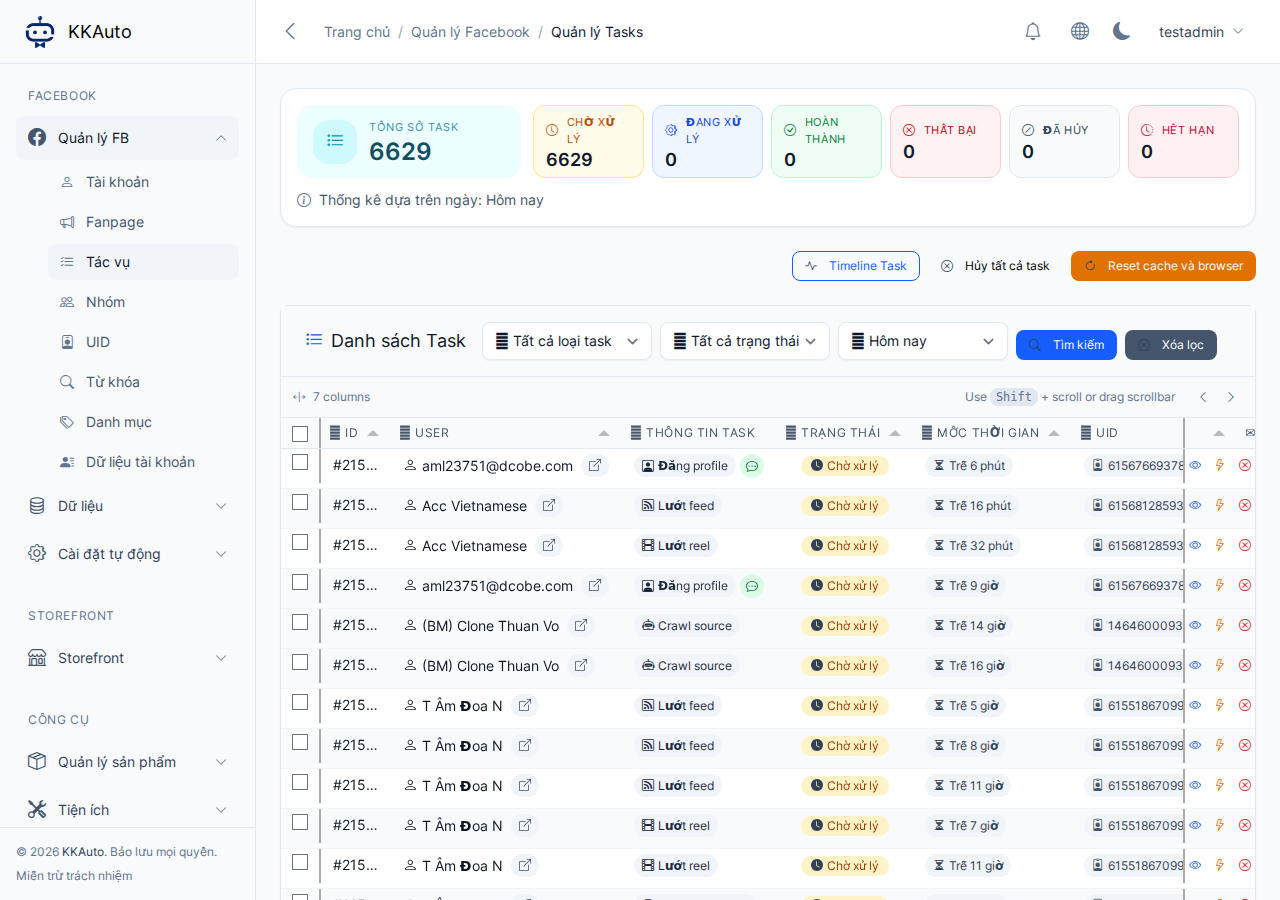
Steps
- Open Facebook > Tasks.
- Filter by:
- Status (pending, running, completed, failed, cancelled…)
- Account, task type, date range
- Open task details to view attempts and error messages.
- Tasks pending for a long time:
- Desktop app: connected and automation running
- Account ready, browser profile correctly linked
- Failed tasks — read the message, retry or cancel as appropriate; do not increase parallel task count when errors repeat.
- Cross-reference with the monitor / log screen in the desktop app (if available).
Common task statuses
Short summary below. Full table and retry guidance: Task statuses.
| Status | Meaning |
|---|---|
| Pending | Server has the task, waiting for a machine to pick it up |
| Running | Machine is processing the task |
| Completed | Finished successfully |
| Failed | Read the reason and decide whether to retry |
| Cancelled | Will not be executed |
Expected outcome
You know which tasks need intervention (machine, account, browser) instead of guessing.